
Maximising Solar Returns: Why I Switched from Home Assistant to Gridkeeper for Energy Trading

If you have a solar and battery setup, you already know that simply generating power isn't always enough anymore. To get the best return on your investment, intelligent energy trading architecture can make a significant difference.
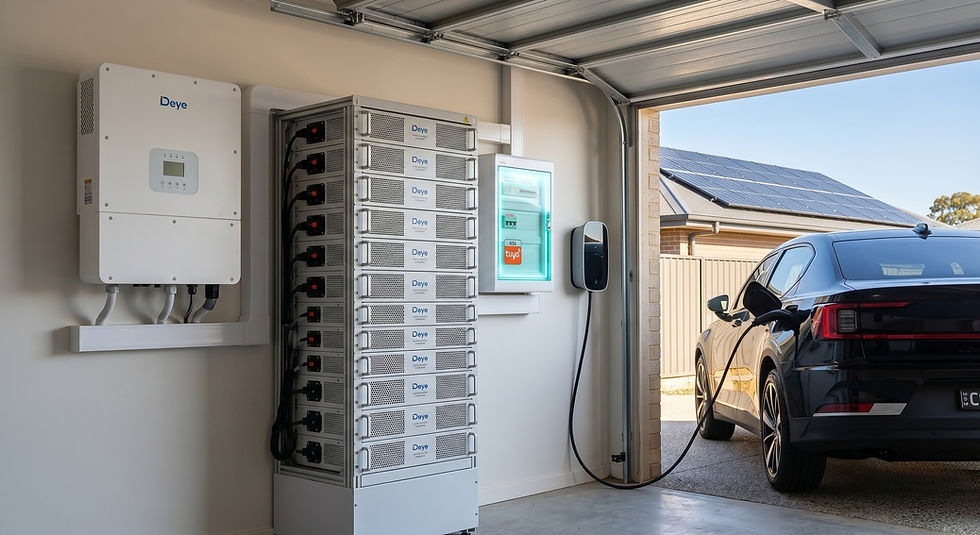
For context, my current home setup consists of a Deye inverter, 61.44kWh of battery storage, 15.84kW of solar panels, and a Polestar 2. I am connected to Amber Electric, which allows me to access wholesale energy pricing. Navigating wholesale rates—whether you use Amber, Localvolts, or any of the other energy retailers in Australia—requires a reliable automation strategy to ensure you buy low and sell high.
Here is a look at my journey from spending months building custom code to migrating everything to a highly reliable, cloud-based platform in under 20 minutes.
The Home Assistant Era: Powerful but Complex

Initially, I went down the DIY route, using Home Assistant to control my energy trading. Home Assistant is brilliant for tinkerers, and over several months, I built out a detailed automation system.
I connected Amber to Home Assistant via API, integrated my Tuya-based smart devices (including a 40A Tuya DIN-rail mounted switch for the hot water system), and linked my 5 reverse cycle split-system air conditioners using Sensibo controllers.
The main functions of my custom Home Assistant dashboard included:
Three-Tier Energy Selling: I automated battery discharging based on wholesale spikes. At 10c/kWh, the battery sold down to 60%. At 15c/kWh, it sold down to 40%. When prices jumped significantly (90c/kWh or higher), the system exported down to 25% capacity.
Smart Hot Water: During the day when energy was cheap, the hot water system turned on for a minimum of 5 hours, which provided plenty of hot water for a family of four.
Free Heating & Cooling: If the feed-in tariff dropped to 0c or below while generating excess solar, all five air conditioners automatically switched on.
Grid Export Optimisation: When the battery was full and feed-in prices were at or above 0c, excess solar fed into the grid.
Automated Solar Curtailment: The moment feed-in prices went negative, the system curtailed the solar generation to stop the Deye inverter from exporting and costing money.
Predictive Rainy Day Charging: Using Solcast generation forecasts minus my 30-day average household consumption, the system determined if tomorrow would be a low-solar day. If so, it would buy off-peak energy from the grid (capped at 15c/kWh) to charge the battery to 60%.
The Catch with Home Assistant
While the automations were effective, the reality is that Home Assistant has a steep learning curve.
To pull this off, you need to be confident setting up and maintaining a local server. You need to be proficient in networking and Modbus to establish communication between the software and your inverter. On top of that, you need the ability to code to build custom functions and dashboards. It is not a simple set-and-forget solution.
Building a Better Way: Introducing Gridkeeper by Dusk Energy

This exact frustration is what drove me and the team at Dusk Energy to build a better solution. We knew that controlling Consumer Energy Resources (CERs) shouldn't require advanced IT skills. We wanted to create a platform that made intelligent energy trading accessible to everyone, streamlining the entire process.
So, we built Gridkeeper.
Recently, I retired my complex Home Assistant dashboard and migrated my entire home setup over to our platform.
Gridkeeper operates entirely in the cloud, connecting to CERs seamlessly via API. This eliminates the need for Modbus networking, dedicated local hardware, or constantly updating server software. The reliability is excellent because it isn't dependent on an old computer sitting in a study.
Best of all, Gridkeeper is completely free for home users, and we have committed to ensuring it always will be. Whether you are running a Deye, Sigenergy, or Sungrow system, the platform handles the integrations seamlessly. Plus, the platform is continually being updated with new integrations, so support for even more inverter brands and smart home devices is constantly expanding.
The transition was incredibly straightforward. From beginning to end, it took me around 20 minutes to:
Connect my Amber Electric feed.
Link my Deye inverter and battery bank.
Connect my Tuya hot water switch.
Integrate my Sensibo air conditioning units.
Rebuild my entire suite of energy trading automations using Advanced Mode.
I used Advanced Mode because I wanted to recreate the granular, multi-tiered logic I had originally built myself. It gave me the same level of control as Home Assistant, but with a clean, intuitive interface that worked right out of the box.
Scaling for Any System Size (Even Solar-Only Homes)

While I have built up a fairly large system over time, one of the primary goals when developing Gridkeeper was to ensure it caters to the broader market, scaling down seamlessly for everyday households.
Optimising Smaller Batteries
If you have a standard 5kWh or 10kWh battery, you can't afford to dump your stored energy into the grid unnecessarily. Gridkeeper allows you to set precise parameters to ensure a smaller battery is preserved for your own evening consumption, only ever exporting to the grid if the wholesale price hits an extreme premium. This ensures the battery covers your household loads first.
Protecting Solar-Only Systems (No Battery)
This is where the platform is particularly useful. Across Australia—especially in places like NSW—homeowners are increasingly being exposed to negative feed-in tariffs. If you have solar panels but no battery, exporting power in the middle of the day can actually cost you money.
Gridkeeper allows you to automatically curtail your solar inverter the second the feed-in tariff drops below 0c. It instantly stops your system from exporting to the grid, saving you from paying to generate power.
Automating High-Draw Loads: EV Chargers, Pools, and Pumps
If you want to absorb that excess solar instead of curtailing it, Gridkeeper excels at load control. You can easily integrate and automate heavy-drawing appliances to soak up cheap or free energy:
EV Chargers: It supports EV chargers with OCPP (Open Charge Point Protocol), allowing you to automate vehicle charging when wholesale rates drop or your solar is clipping.
Pool Pumps & Heaters: Sync your pool equipment to run exclusively during peak solar production hours.
Water Pumps & Lighting: Automate rural pumps or intensive lighting setups to trigger based on live energy pricing.
A Solution for Every Skill Level

For those who enjoy diving into the technical side, Advanced Mode offers excellent control without the coding requirements.
However, if you are not confident connecting devices and setting up automations from scratch, Gridkeeper also features Essentials Mode.
Essentials Mode strips away the complexity entirely. In the settings, you can browse a selection of Virtual Power Plant (VPP) operators who employ varying market strategies. You can simply connect with an operator who aligns with your goals, and they will assist you in getting your system set up, managing the trading on your behalf.
If you want to take control of your solar exports, avoid negative feed-in tariffs, reliably automate your heavy loads, and simplify your home energy setup, it is well worth checking out.
Visit the website to get started: www.dusk.energy
Join the community: Follow Gridkeeper on Facebook


Comments